
Bookmarking Demon is an automated social bookmarking tool that has been around for a while and has quite a following. No doubt, it’s one of the best tools of this kind available. So let’s take a close look at it and see what its strengths and weaknesses are.
First of all, the software is very often updated. If you don’t use it daily, chances are you will get to update the program almost every time you launch it. That means it’s an actively updated software and the developers keep working on it, it’s not just a one night wonder as often is the case with many programs out there.
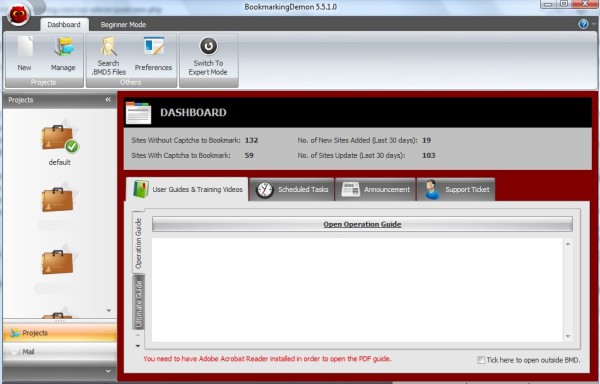
Bookmarking Demon has an attractive and easy to use interface that works in two modes – Beginner and Expert mode. The modes are different in the way the bookmarking process is handled by the user. In the Beginner mode it’s a step by step process where you just follow the steps, while the Expert mode is more flexible and gives the user more control. Either mode is quite straight forward and easy to use.
Social Bookmarking Sites and Accounts
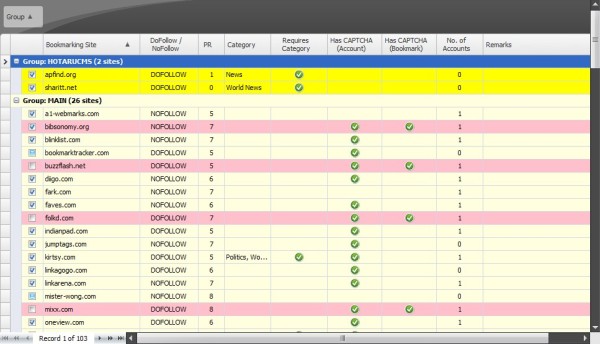
As of writing this, BMD has 103 social bookmarking sites in its database. The database is regularly updated, sites are added and removed. Before you can begin bookmarking your websites and pages, you have to create accounts with some or all of these bookmarking sites. The process is automated where there are no captchas and it lets you easily enter the captchas where necessary. Overall, registering accounts is easy and you only have to do it once.
The sites in the database are stored with important information, such as PageRank, nofollow, categories, the type of script a site uses. You can also add your own sites to the database.
Bookmarking
To bookmark a page you have to add it to the program (obviously). Bookmarking Demon gives you a few options to do that – you can add a single page, add a site and let it crawl the pages or submit a list of pages in CSV or XML format.
After adding your pages and right before you click the Start button, you can adjust the so called Spammometer which controls the speed at which BMD submits bookmarks.
Click Start and the auto submission process starts. If some sites require a captcha, you will be prompted to enter one. The submission process goes on behind the scenes so you only see the submission information and not the sites in action. That makes things easier and less messy.
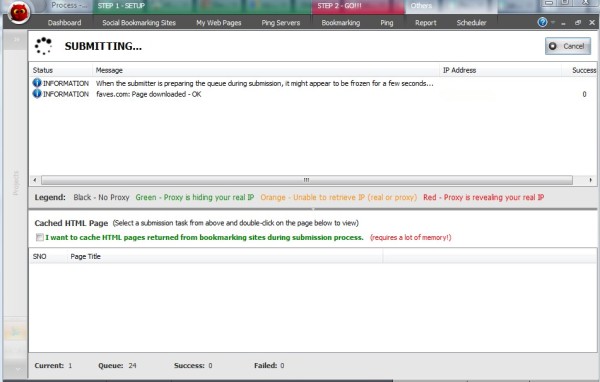
After the submission is complete you get the report with the status of submissions to each bookmarking site.
Other Features
Bookmarking Demon also has some advanced features such as:
- Pinging
- Reporting
- Scheduling submissions
Strengths and Weaknesses
Overall BMD is a great piece of software. It does what it does well and I’ve been using it successfully for a couple of years myself. As its biggest strengths I would point out its user-friendly interface, its speed and seamless automated submission process – bookmarking can’t get any easier.
But nothing is perfect and I do have some caveats with BMD too. As its weakness I would mention the rather clumsy management of multiple accounts. The biggest thing I miss here is the ability to apply accounts across all sites – as it stands, it requires you to go through the registration process with each site. If you already have accounts with several sites, you can’t easily apply them.
Regardless of that, I can recommend Bookmarking Demon to anyone who wants to automate their social bookmarking.
Good review, am cosdidering getting this software myself
We are researching information on this software. I wish I could see what’s negative about this software.
There’s not much negative about it. It does what it does well. I’ve noted some of it’s weaknesses in the review that in my opinion can be better, and that’s that.
I currently use Bookmark Wiz. Have you used that software before // do you think it is better or worse than Bookmarking Demon? Bookmark Wiz seems to work well but it’s only like 30 websites and they break a LOT.
Thanks for the post,
Andrew
No, sorry, I haven’t heard of it before.
Anybody who used & experienced this software ?
I have, hence the review. Any questions?
Looks interesting. Is it for traffic generation or SEO?
SEO. Though I can see some visits from some of the bookmark sites, it’s very scarce.
Is the ping feature the same as the one used in scrapebox?
I’ve not used Scrapebox but based on what I’ve just read about its ping feature (that it pings referrer logs), no BMD doesn’t do that. It only pings the ping servers, like WordPress does.
Can I add sites? Does the program allow me to create articles and submit to the sites?
Yes, it allows to add certain types of bookmarking sites, namely sites that run on pligg, scuttle or phpdug scripts.
As far as articles, no, it’s not an article submitter and the bookmarking sites allow only a short description, you can’t submit an article.
Looks like a really useful piece of software. The blurb on their website suggests that the handling of multiple user accounts is straightforward so I was extremely interested in your comments. Food for thought but may give it a try!
It is pretty straightforward but tedious when you need to change/update all accounts. It’s easy and simple to manage accounts one by one, but there are a lot of them and that’s where an extra feature to update accounts en masse would really come in handy.
I have difficulty in applying the category, I have put the category on the BMD but the submission often rejected, it said that I haven’t chosen the category, I still don’t have any idea how to solve it 🙁
I get that too with some sites. But who cares if one or two submissions don’t go through, you’ll never get it perfect. My guess is that some categories are not there in some sites. Whatever the case, it doesn’t matter, most of them work and that’s more than enough.
it is a very good and a perfect software, i am suggesting people as an SEO expert. Now a days bookmarking is very important and it is a regular part of SERPs Rankings. Highly recommended!
Thank you for this review. I’ve been thinking to buy one so this actually helps me in deciding if I should get it or not..
Thank you very much
Good to see a review of the functionality. I am considering get this software. I have been using SocialMonkee for a few weeks now, which is another new social bookmarking tool But from this review it seems Bookmarking Demon is a more flexible and complex piece of software, which is probably why it it more expensive. The pinging feature would save a lot of time compared to SocialMonkee where you have to do all the pinging yourself.
The question which is still in my mind is whether or not we are allowed to add username/password to each of the bookmarking site. I already have accounts in some bookmarking sites.
Yes, we can do that.
Thanks for the information.i have been mulling over using only wire vs book mark demon. After a lot of research its pretty clear book marking demon wins. I wanted to know whether it can be used for more than one site. If you own a couple of sites, in the same niche, is it possible to use the same software for all of them.
Yes, it is possible.
hey admin, just a quick question? are you still using Bookmarking Demon? And if so, what kind of success are you seeing. When you originally did this review it was a little while ago, and way before the string of google updates. So if these tools are still working, then that means that much of the old link building tactics that everyone has said don’t work, do in fact still work. i JUSTthink it would be interesting to hear your opinion now and to see if it has changed at all.
Hi,
I still use it from time to time. It’s part of link building plan as usual, it doesn’t get much results on its own but it adds up. With Google changes the same methods still work but you just have to be a lot more careful about using them.